dbt Charts 0.10.0 is the largest release since our public beta began, with 73 new features. Here’s everything we are excited about.
Custom charts
Imagine you wanted to understand the popularity of categories over time. A bump chart (left) is great at showing change in rank, but doesn’t convey any sense of real magnitude. For that we might try an ordinary stacked area chart (right), but its order is set globally and doesn’t show changes in rank.
See the YAMLa example
queries:
  genre_streams:
    notes: Illustrative monthly streams, in billions. Hip-hop overtakes Pop in May; Latin climbs from last to third by July.
    columns: [month, genre, streams, rank]
    values:
      - ["2025-01-01", Hip-hop, 26, 2]
      - ["2025-01-01", Pop, 30, 1]
      - ["2025-01-01", Latin, 8, 5]
      - ["2025-01-01", Country, 10, 4]
      - ["2025-01-01", Rock, 14, 3]
      - ["2025-02-01", Hip-hop, 27, 2]
      - ["2025-02-01", Pop, 31, 1]
      - ["2025-02-01", Latin, 9, 5]
      - ["2025-02-01", Country, 10, 4]
      - ["2025-02-01", Rock, 13, 3]
      - ["2025-03-01", Hip-hop, 28, 2]
      - ["2025-03-01", Pop, 32, 1]
      - ["2025-03-01", Latin, 10, 5]
      - ["2025-03-01", Country, 11, 4]
      - ["2025-03-01", Rock, 13, 3]
      - ["2025-04-01", Hip-hop, 29, 2]
      - ["2025-04-01", Pop, 30, 1]
      - ["2025-04-01", Latin, 11, 4]
      - ["2025-04-01", Country, 11, 5]
      - ["2025-04-01", Rock, 12, 3]
      - ["2025-05-01", Hip-hop, 30, 1]
      - ["2025-05-01", Pop, 29, 2]
      - ["2025-05-01", Latin, 12, 4]
      - ["2025-05-01", Country, 12, 5]
      - ["2025-05-01", Rock, 12, 3]
      - ["2025-06-01", Hip-hop, 31, 1]
      - ["2025-06-01", Pop, 28, 2]
      - ["2025-06-01", Latin, 13, 3]
      - ["2025-06-01", Country, 13, 4]
      - ["2025-06-01", Rock, 12, 5]
      - ["2025-07-01", Hip-hop, 31, 1]
      - ["2025-07-01", Pop, 27, 2]
      - ["2025-07-01", Latin, 14, 3]
      - ["2025-07-01", Country, 13, 4]
      - ["2025-07-01", Rock, 11, 5]
      - ["2025-08-01", Hip-hop, 32, 1]
      - ["2025-08-01", Pop, 27, 2]
      - ["2025-08-01", Latin, 14, 3]
      - ["2025-08-01", Country, 13, 4]
      - ["2025-08-01", Rock, 11, 5]
      - ["2025-09-01", Hip-hop, 31, 1]
      - ["2025-09-01", Pop, 26, 2]
      - ["2025-09-01", Latin, 15, 3]
      - ["2025-09-01", Country, 12, 4]
      - ["2025-09-01", Rock, 11, 5]
      - ["2025-10-01", Hip-hop, 30, 1]
      - ["2025-10-01", Pop, 26, 2]
      - ["2025-10-01", Latin, 16, 3]
      - ["2025-10-01", Country, 12, 4]
      - ["2025-10-01", Rock, 10, 5]
      - ["2025-11-01", Hip-hop, 29, 1]
      - ["2025-11-01", Pop, 25, 2]
      - ["2025-11-01", Latin, 17, 3]
      - ["2025-11-01", Country, 11, 4]
      - ["2025-11-01", Rock, 10, 5]
      - ["2025-12-01", Hip-hop, 28, 1]
      - ["2025-12-01", Pop, 25, 2]
      - ["2025-12-01", Latin, 18, 3]
      - ["2025-12-01", Country, 11, 4]
      - ["2025-12-01", Rock, 10, 5]
charts:
  ranks:
    type: line
    title: Rank by monthly streams
    query: genre_streams
    x: month
    y: rank
    color: genre
    style:
      axis_y:
        scale:
          domain: [5, 1]
  streams:
    type: area
    title: Monthly streams, in billions
    query: genre_streams
    x: month
    y: streams
    color: genre
    style:
      stack: zero

rows:
  - cols:
      - ranks
      - streams
What if we could combine these chart forms? The sorted streamgraph, below, re-sorts the stack every month so the largest genre is always on top. Hip-hop passes Pop in May, and Latin climbs from last place to third by July.
See the YAMLa example
queries:
  genre_streams:
    notes: Illustrative monthly streams, in billions. Hip-hop overtakes Pop in May; Latin climbs from last to third by July.
    columns: [month, genre, streams, rank]
    values:
      - ["2025-01-01", Hip-hop, 26, 2]
      - ["2025-01-01", Pop, 30, 1]
      - ["2025-01-01", Latin, 8, 5]
      - ["2025-01-01", Country, 10, 4]
      - ["2025-01-01", Rock, 14, 3]
      - ["2025-02-01", Hip-hop, 27, 2]
      - ["2025-02-01", Pop, 31, 1]
      - ["2025-02-01", Latin, 9, 5]
      - ["2025-02-01", Country, 10, 4]
      - ["2025-02-01", Rock, 13, 3]
      - ["2025-03-01", Hip-hop, 28, 2]
      - ["2025-03-01", Pop, 32, 1]
      - ["2025-03-01", Latin, 10, 5]
      - ["2025-03-01", Country, 11, 4]
      - ["2025-03-01", Rock, 13, 3]
      - ["2025-04-01", Hip-hop, 29, 2]
      - ["2025-04-01", Pop, 30, 1]
      - ["2025-04-01", Latin, 11, 4]
      - ["2025-04-01", Country, 11, 5]
      - ["2025-04-01", Rock, 12, 3]
      - ["2025-05-01", Hip-hop, 30, 1]
      - ["2025-05-01", Pop, 29, 2]
      - ["2025-05-01", Latin, 12, 4]
      - ["2025-05-01", Country, 12, 5]
      - ["2025-05-01", Rock, 12, 3]
      - ["2025-06-01", Hip-hop, 31, 1]
      - ["2025-06-01", Pop, 28, 2]
      - ["2025-06-01", Latin, 13, 3]
      - ["2025-06-01", Country, 13, 4]
      - ["2025-06-01", Rock, 12, 5]
      - ["2025-07-01", Hip-hop, 31, 1]
      - ["2025-07-01", Pop, 27, 2]
      - ["2025-07-01", Latin, 14, 3]
      - ["2025-07-01", Country, 13, 4]
      - ["2025-07-01", Rock, 11, 5]
      - ["2025-08-01", Hip-hop, 32, 1]
      - ["2025-08-01", Pop, 27, 2]
      - ["2025-08-01", Latin, 14, 3]
      - ["2025-08-01", Country, 13, 4]
      - ["2025-08-01", Rock, 11, 5]
      - ["2025-09-01", Hip-hop, 31, 1]
      - ["2025-09-01", Pop, 26, 2]
      - ["2025-09-01", Latin, 15, 3]
      - ["2025-09-01", Country, 12, 4]
      - ["2025-09-01", Rock, 11, 5]
      - ["2025-10-01", Hip-hop, 30, 1]
      - ["2025-10-01", Pop, 26, 2]
      - ["2025-10-01", Latin, 16, 3]
      - ["2025-10-01", Country, 12, 4]
      - ["2025-10-01", Rock, 10, 5]
      - ["2025-11-01", Hip-hop, 29, 1]
      - ["2025-11-01", Pop, 25, 2]
      - ["2025-11-01", Latin, 17, 3]
      - ["2025-11-01", Country, 11, 4]
      - ["2025-11-01", Rock, 10, 5]
      - ["2025-12-01", Hip-hop, 28, 1]
      - ["2025-12-01", Pop, 25, 2]
      - ["2025-12-01", Latin, 18, 3]
      - ["2025-12-01", Country, 11, 4]
      - ["2025-12-01", Rock, 10, 5]
charts:
  streams_ordered_custom:
    type: custom
    title: Sorted streamgraph (custom)
    subtitle: The same streams, re-stacked each month so the largest genre is on top.
    query: genre_streams
    x: month
    y: streams
    color: genre
    options:
      label_every: 1
    svg: |
      {#---
      description: Sorted streamgraph. At every x step the bands re-stack in value order, largest on top.
      channels:
        x:
          description: Ordered step column, one value per step (a month).
        y:
          description: The value stacked at each step.
        color:
          description: The series each band follows.
      options:
        label_every:
          type: integer
          default: 3
      ---#}
      {% macro wt(w) %}{{ w | int if w is number else w }}{% endmacro %}{# style weights arrive as floats (600.0), which SVG ignores #}
      {# The axis cascade, re-implemented by hand: axis_quantitative > axis_y > axis. #}
      {% set ax = style.charts.axis %}{% set aq = style.charts.axis_quantitative %}{% set ay = style.charts.axis_y %}{% set axx = style.charts.axis_x %}
      {% set ygrid_color = aq.grid.color if aq.grid.color is not none else (ay.grid.color if ay.grid.color is not none else ax.grid.color) %}
      {% set ygrid_width = aq.grid.width if aq.grid.width is not none else (ay.grid.width if ay.grid.width is not none else ax.grid.width) %}
      {% set qfont = namespace(family=aq.labels.font.family or ax.labels.font.family, color=aq.labels.font.color or ax.labels.font.color, size=aq.labels.font.size or ax.labels.font.size, weight=aq.labels.font.weight or ax.labels.font.weight) %}
      {% set cfont = ax.labels.font %}
      {% set ytick_color = aq.ticks.color or ay.ticks.color or ax.ticks.color %}
      {% set ytick_width = aq.ticks.width if aq.ticks.width is not none else (ay.ticks.width if ay.ticks.width is not none else ax.ticks.width) %}
      {% set xtick_width = axx.ticks.width if axx.ticks.width is not none else ax.ticks.width %}
      {% set xtick_color = axx.ticks.color or ax.ticks.color %}
      {% set tick_len = ax.ticks.length %}
      {% set lab_pad = ax.labels.padding %}
      {% set stk = style.charts.area.marks.area.stacked %}
      {% set sl = style.charts.series_label.font %}
      {% set compact = width < 400 %}{# the engine's width tiers are not exposed; 400 is a guess #}
      {% set sl_size = sl.compact_size if compact else sl.size %}
      {% set sl_weight = sl.compact_weight if compact else sl.weight %}
      {% set months = ["Jan","Feb","Mar","Apr","May","Jun","Jul","Aug","Sep","Oct","Nov","Dec"] %}
      {% set ns = namespace(xs=[], series=[], top=0) %}
      {% for r in rows %}
        {% if r[channels.x] not in ns.xs %}{% set ns.xs = ns.xs + [r[channels.x]] %}{% endif %}
        {% if r[channels.color] not in ns.series %}{% set ns.series = ns.series + [r[channels.color]] %}{% endif %}
      {% endfor %}
      {# Claim palette slots in the order the stock area does: largest total first, ties by name. #}
      {% set tot = namespace(l=[]) %}
      {% for s in ns.series | sort %}{% set tot.l = tot.l + [dict(n=s, k=-(rows | selectattr(channels.color, "equalto", s) | map(attribute=channels.y) | sum))] %}{% endfor %}
      {% for e in tot.l | sort(attribute="k") %}{% set _ = color_for(e.n, channels.color) %}{% endfor %}
      {% for x in ns.xs %}
        {% set t = rows | selectattr(channels.x, "equalto", x) | map(attribute=channels.y) | sum %}
        {% if t > ns.top %}{% set ns.top = t %}{% endif %}
      {% endfor %}
      {% set raw = ns.top / (aq.ticks.count - 1) %}{# the engine's target count; its height-aware ladder is not exposed #}
      {% set mag = 10 ** math.floor(math.log(raw) / math.log(10)) %}
      {% set norm = raw / mag %}
      {% set step = (1 if norm < 1.5 else 2 if norm < 3 else 5 if norm < 7 else 10) * mag %}
      {% set ymax = math.ceil(ns.top / step) * step %}
      {% set ns2 = namespace(lw=0, rw=0) %}
      {% for v in range(0, (ymax / step) | int + 1) %}{% set w = text_width("0" * ((v * step) | format(",.0f") | length), qfont.size, qfont.weight) %}{# tabular digits: every digit is as wide as a zero #}{% if w > ns2.lw %}{% set ns2.lw = w %}{% endif %}{% endfor %}
      {% for s in ns.series %}{% set w = text_width(s | string, sl_size, sl_weight) %}{% if w > ns2.rw %}{% set ns2.rw = w %}{% endif %}{% endfor %}
      {% set left = ns2.lw + lab_pad + (tick_len if ay.ticks.visible or style.charts.area.axis_y.ticks.visible else 0) %}
      {% set right = ns2.rw + style.charts.area.endpoint_labels.label_offset %}
      {% set bottom = tick_len + lab_pad + cfont.size * 2 * cfont.line_height %}
      {% set top0 = qfont.size / 2 %}
      {% set pw = width - left - right %}
      {% set ph = height - bottom - top0 %}
      {% set dx = pw / (ns.xs | length - 1) %}
      {% set base_y = top0 + ph %}
      <g>
      {% for v in range(1, (ymax / step) | int + 1) %}
        {% set y = base_y - v * step / ymax * ph %}
        <line x1="{{ left }}" x2="{{ left + pw }}" y1="{{ y }}" y2="{{ y }}" stroke="{{ ygrid_color }}" stroke-width="{{ ygrid_width }}" opacity="{{ ax.grid.opacity }}"/>
      {% endfor %}
      {% for v in range(0, (ymax / step) | int + 1) %}
        {% set y = base_y - v * step / ymax * ph %}
        {% if style.charts.area.axis_y.ticks.visible %}<line x1="{{ left - tick_len }}" x2="{{ left }}" y1="{{ y }}" y2="{{ y }}" stroke="{{ ytick_color }}" stroke-width="{{ ytick_width }}"/>{% endif %}
        <text x="{{ left - tick_len - lab_pad }}" y="{{ y }}" dy="0.35em" text-anchor="end" font-family="{{ qfont.family }}" font-size="{{ qfont.size }}" font-weight="{{ wt(qfont.weight) }}" fill="{{ qfont.color }}">{{ (v * step) | format(",.0f") }}</text>
      {% endfor %}
      {% for x in ns.xs %}
        {% set gx = left + loop.index0 * dx %}
        <line x1="{{ gx }}" x2="{{ gx }}" y1="{{ base_y }}" y2="{{ base_y + tick_len }}" stroke="{{ xtick_color }}" stroke-width="{{ xtick_width }}"/>
        {% if loop.index0 % options.label_every == 0 %}
        <text x="{{ gx }}" y="{{ base_y + tick_len + lab_pad }}" dy="0.8em" text-anchor="{{ 'start' if loop.first else 'middle' }}" font-family="{{ cfont.family }}" font-size="{{ cfont.size }}" font-weight="{{ wt(cfont.weight) }}" fill="{{ cfont.color }}">{{ months[(x[5:7] | int) - 1] }}{% if loop.first %}<tspan x="{{ gx }}" dy="1.25em">{{ x[0:4] }}</tspan>{% endif %}</text>
        {% endif %}
      {% endfor %}
      {% for s in ns.series | reverse %}{# smallest first: Rock passes behind as it falls #}
        {% set p = namespace(top=[], bot=[]) %}
        {% for x in ns.xs %}
          {% set stepRows = rows | selectattr(channels.x, "equalto", x) | list %}
          {% set v = (stepRows | selectattr(channels.color, "equalto", s) | first)[channels.y] %}
          {% set acc = namespace(below=0) %}
          {% for r in stepRows %}
            {% if r[channels.y] < v or (r[channels.y] == v and r[channels.color] < s) %}{% set acc.below = acc.below + r[channels.y] %}{% endif %}
          {% endfor %}
          {% set p.top = p.top + [[left + loop.index0 * dx, base_y - (acc.below + v) / ymax * ph]] %}
          {% set p.bot = p.bot + [[left + loop.index0 * dx, base_y - acc.below / ymax * ph]] %}
        {% endfor %}
        {% set d = namespace(s="M" ~ p.top[0][0] ~ "," ~ p.top[0][1]) %}
        {% for i in range(1, p.top | length) %}{% set a = p.top[i - 1] %}{% set b = p.top[i] %}{% set m = (a[0] + b[0]) / 2 %}{% set d.s = d.s ~ " C" ~ m ~ "," ~ a[1] ~ " " ~ m ~ "," ~ b[1] ~ " " ~ b[0] ~ "," ~ b[1] %}{% endfor %}
        {% set rb = p.bot | reverse | list %}
        {% set d.s = d.s ~ " L" ~ rb[0][0] ~ "," ~ rb[0][1] %}
        {% for i in range(1, rb | length) %}{% set a = rb[i - 1] %}{% set b = rb[i] %}{% set m = (a[0] + b[0]) / 2 %}{% set d.s = d.s ~ " C" ~ m ~ "," ~ a[1] ~ " " ~ m ~ "," ~ b[1] ~ " " ~ b[0] ~ "," ~ b[1] %}{% endfor %}
        {% set c = color_for(s, channels.color) %}
        <path d="{{ d.s }} Z" fill="{{ c }}" fill-opacity="{{ stk.opacity }}" stroke="{{ stk.stroke.color }}" stroke-width="{{ stk.stroke.width }}" stroke-linejoin="{{ stk.stroke.join }}" stroke-linecap="{{ stk.stroke.cap }}"><title>{{ s }}</title></path>
        <text x="{{ left + pw + style.charts.area.endpoint_labels.label_offset }}" y="{{ (p.top[-1][1] + p.bot[-1][1]) / 2 }}" dy="0.35em" font-family="{{ sl.family }}" font-size="{{ sl_size }}" font-weight="{{ wt(sl_weight) }}" fill="{{ c }}">{{ s }}</text>
      {% endfor %}
      {% if ax.grid.threshold.visible %}
        <line x1="{{ left }}" x2="{{ left + pw }}" y1="{{ base_y }}" y2="{{ base_y }}" stroke="{{ ax.grid.threshold.color }}" stroke-width="{{ ax.grid.threshold.width }}"/>
      {% endif %}
      </g>

rows:
  - streams_ordered_custom
Until this release, no chart type in dbt Charts could draw the sorted
streamgraph. But now we can. We drew it with type: custom, new in
dbt Charts 0.10.0.
A custom chart is a template. SVG, the vector format every browser draws, describes the shapes, and Jinja, the templating language dbt projects already use, fills them in from your query’s rows each time the board renders. The Jinja template works out the axis, the mark order, and the label positions. When the data changes, the custom chart updates too.
The template also reads the board’s theme. Its colors, fonts and gridlines come from the same style the stock charts use, so it sits beside them as one of their own. Change the theme, and the custom chart follows:
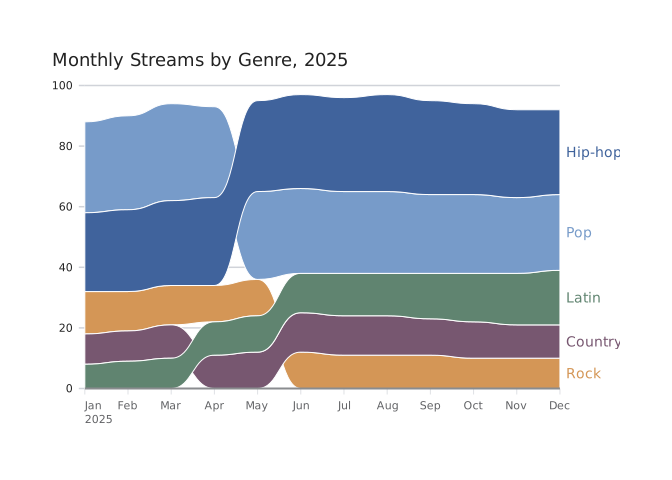
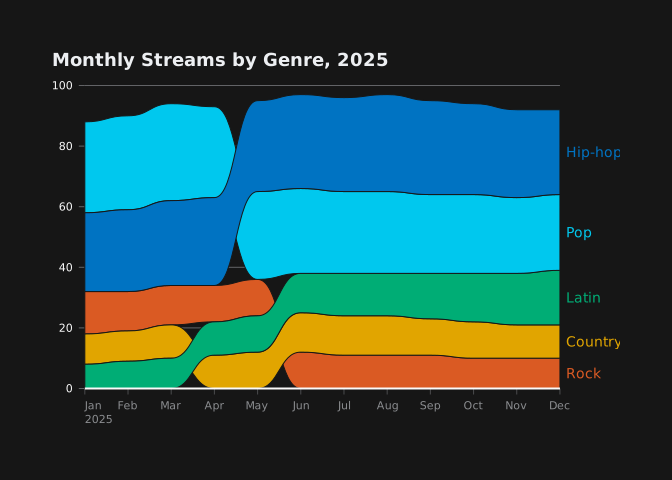
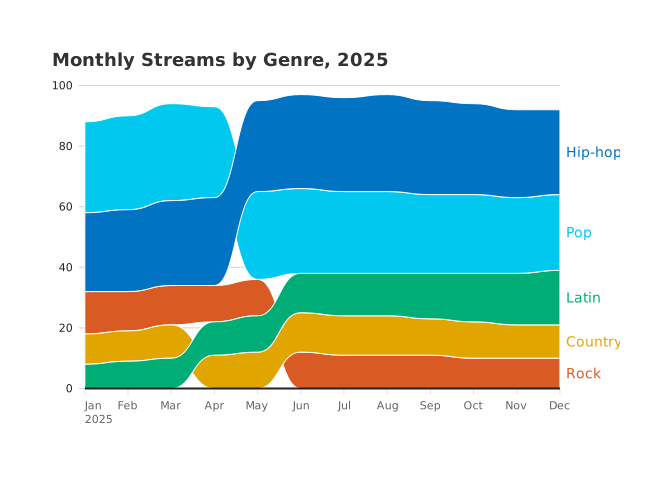
The same custom chart in the clarity, neon and vivid themes.
Custom charts are here, but not at the expense of additional first-class charts. We are currently working on adding more stock chart forms to dbt Charts for a future release. See the stock charts available today in our chart types showcase.
Where the bump chart comes from
There’s evidence that the bump chart dates to nearly 200 years ago. Bump charts come from the college bumps races at Oxford (since 1815) and Cambridge. A bumps race is a form of rowing race designed for a narrow body of water, like a river, that isn’t good for side-by-side competition. A number of boats chase each other in single file, each crew attempting to overtake and “bump” the boat in front without being caught by the boat behind.
W. E. Sherwood summarized the history of the races using a simple bump chart in Oxford Rowing (1900).
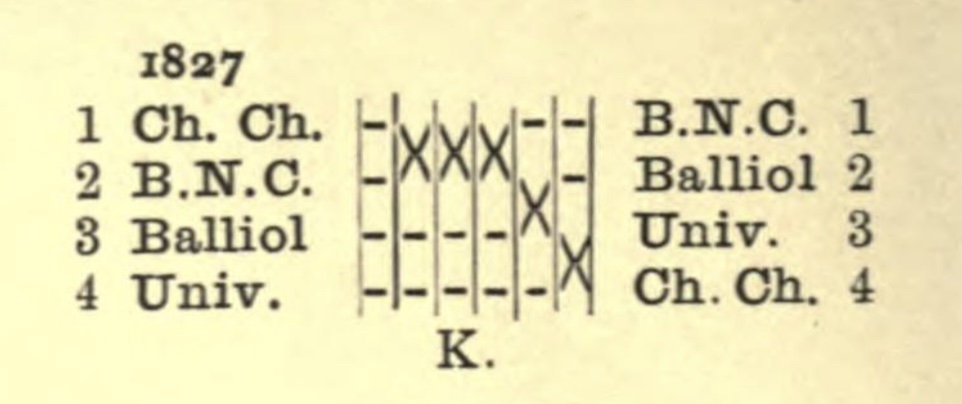
W. E. Sherwood, Oxford Rowing (1900). K. indicates his data source for this race.
By that time, the chart was already applied beyond boat races. For example, Henry Gannett used it to show the rank of U.S. state populations in his Statistical Atlas of the United States, Based upon Results of the Eleventh Census:
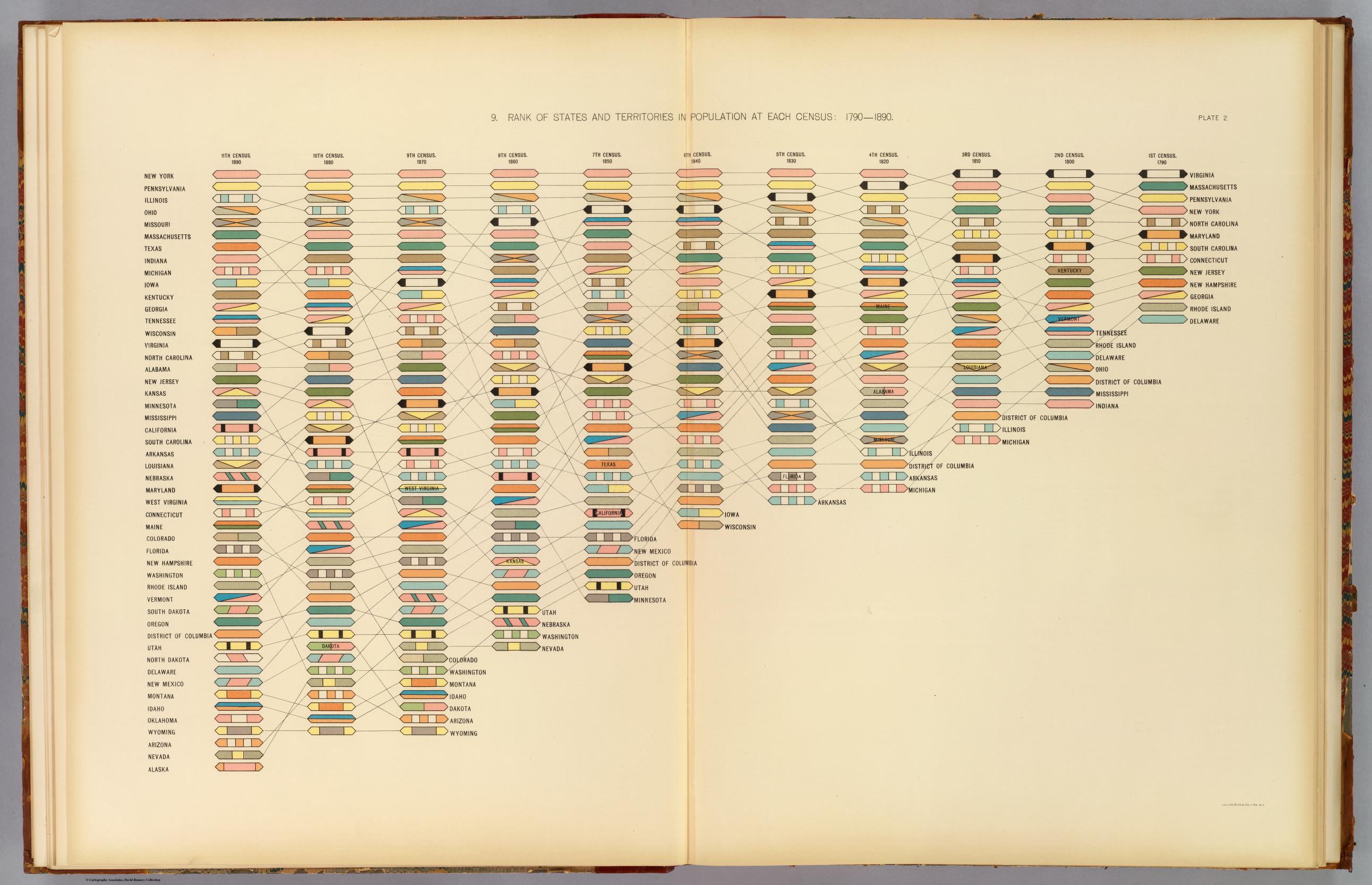
Henry Gannett, Rank of States and Territories in Population at Each Census: 1790–1890 (1898). David Rumsey Map Collection.
New warehouse connections
dbt Charts now connects to Databricks, Microsoft SQL Server and Microsoft
Fabric. Each installs as an extra: dbt-charts[databricks],
dbt-charts[sqlserver] and dbt-charts[fabric]. Databricks is a source type of
its own, and signs in with a personal access token or an OAuth service
principal. SQL Server and Fabric connect through the targets in your dbt
profile.
More warehouses raise a familiar problem: SQL written for one rarely runs
unchanged on another. A query can now declare the dialect: its SQL is written
in, and dbt Charts translates it for the warehouse it runs on, so one board
can run on several warehouses:
queries:
  monthly_tickets:
    dialect: duckdb
    source: my_warehouse
    sql: |
      SELECT
        date_trunc('month', created_at) AS month,
        COUNT(*) AS tickets
      FROM {{ ref('fct_tickets') }}
      GROUP BY 1
Run on BigQuery, Snowflake or Databricks, the same query gets each warehouse’s
spelling of date_trunc. A dashboard pack shipped inside a dbt package no
longer needs one query per warehouse.
Column-driven formats
Before 0.10.0, a value format belonged to a chart. To show revenue in multiple
places on the same board would require writing currency at each instance.
Now, a query can say how each of its columns prints, with formats:. Below,
the bar chart’s axis labels and the table’s cell values read their format from
the query. Change the format in one place, and every chart that shows the
column changes with it.


A dbt model can carry the format too. A column’s
meta.format prints in
every board query that reads the column, even after a sum().
One switch for a board’s language
A number’s format is only one part of how it reads. Different regions prefer their numbers expressed in different ways. For example, an American writes 1,250,000 where a German reader writes 1.250.000.
A board’s regional: section sets the locale once, for that board or for a
whole folder of boards through meta.yml:


Money formats print the board’s currency, so one board can print dollars with
German separators, as this one does. locale.time does the same for month and
weekday names, and for the day a date picker’s week starts on.
regional.language sets the words dbt Charts writes itself, such as tab
names, control labels and quarter names, in any of 19 languages.
Names for what you repeat
Some choices repeat across a whole board: a second currency, a serif for
headings, a small uppercase label. Fonts can now be named under style.fonts
and used anywhere a font goes, and a named format under style.formats can now
carry its own prefix, suffix and notation:
style:
  formats:
    eur:
      spec: number_full
      prefix: "€"
  fonts:
    heading:
      family: "'Source Serif 4', Georgia, serif"
    tag:
      extends: label
      weight: 600
      case: upper
The eur format is the one in the formats figure above, and its euro sign
prints on axes, labels and hover cards alike. A font can extends: another and
change only what differs, as tag does here. Redefine one of the engine’s own
format names, such as currency, and the board restyles it everywhere.
Spanners and legends
Tables can write a shared label over a run of columns. A spanners: entry
names the label and the columns it covers, and draws a rule under exactly those
columns:


A legend’s position: now takes an edge (top, right, bottom or left) and an
align along it (start, center or end). overlay: true floats it over the plot instead of
reserving a strip for it, which works when the plot has empty space to land on.
The two overlay frames also stack their legend with direction: vertical:


Text that reads the data
A board’s text can quote a query. Write {{ queries.release.one.features }} in a
paragraph, and the paragraph prints the number the query returns, so the prose
updates when the data does. Titles, subtitles and KPI labels work the same way.
The board below reads three queries, one in its title and the rest in its
paragraph:
title: "{{ queries.release.one.features }} new features"
queries:
  release:
    columns: [features, fixes, performance, breaking]
    values:
      - [73, 135, 7, 10]
  github:
    columns: [issues_closed]
    values:
      - [12]
  cadence:
    columns: [days]
    values:
      - [17]

rows:
  - text: |
      0.10.0 arrived {{ queries.cadence.one.days }} days
      after 0.9.1. Alongside its new features came
      **{{ queries.release.one.fixes }} fixes**,
      {{ queries.github.one.issues_closed }} of them for
      issues you filed on GitHub, and
      **{{ queries.release.one.performance }} performance
      improvements**. Only
      **{{ queries.release.one.breaking }} changes** are
      breaking, and the list below says which of them
      need you.
Everything else in 0.10.0
dct doctor diagnoses connection problems, and a dbt project no longer needs
a dbt_charts.yml to get started.
For agents, every MCP tool now says whether it only reads, so a host can approve
read-only tools without asking. Query results come back as CSV capped at 25,000
tokens, and board search pages through long results. The dbt Charts
repository is also a Claude plugin marketplace now: its dbt-charts plugin
bundles the dbtcharts.com connector with the board authoring skills.
dbtCharts.com now connects to GitLab, Bitbucket and other Git repositories in addition to GitHub. Its access pages are rebuilt around a single scrolling profile for each member and team, with a read-only Check access page that gives its verdict first, and an audit log you can filter and export as CSV or JSON. On folder pages, you can now rename, move, duplicate and delete boards from a menu, create folders, and drag boards between them.
The install is roughly 30% smaller (about 125 MB), because dbt Charts no
longer depends on pyarrow. Query results now live in a cache
file that survives restarts and that several dct processes can share, so
re-rendering a board doesn’t re-run its queries.
Screen readers announce each chart by name. Markdown images in a board’s text
embed in the render instead of being fetched by the viewer. And dbt Charts
now collects anonymous usage statistics; set DO_NOT_TRACK=1 to turn them off.
There are 135 fixes as well, including 12 for issues you filed on GitHub. The release notes list every change.
Before you upgrade
Most boards upgrade on their own: retired keys such as a chart’s
number_format and time_format move to their new homes automatically. (If the
axis already has a label format of its own, move the old one by hand.) A few
changes need you:
- dbt Charts now requires Python 3.11 or newer.
- A markdown image path rooted in
charts/needs a leading/, such as/assets/logo.png. - Agent tools are consolidated.
execute_queryis nowexecute_sql, which also runs a stored board’s named query.search_boards,glob_filesandgrep_filesare now onesearch_filestool. Thevalidate_board,query_board,search_skillsanddescribe_querytools are gone:render_boardvalidates, andlist_skillslists skills.dct queryandexecute_sqlno longer take a limit. dct cloud project connecttakes the git host first (github,gitlab,bitbucketorgit), and git credentials go in separate username and password options.- Trino sources no longer use dbt-trino, and verify TLS certificates unless
cert: falseis set. - A date-only
label.valuesentry with a trailingZ, such as2024-01-01Z, is now an error.
Tell us what to draw next
A custom chart is also how a new chart type starts. When enough of you draw the same shape by hand, it’s a sign the shape belongs in the language. If dbt Charts can’t draw something you need, tell us:
- Join our community office hours, announced in #dbt-charts in the dbt Community Slack.
- Start a discussion or ask a question in that channel.
- Open an issue on GitHub.
- Email support@getdbt.com.
dbt Charts 0.10.0 is out now. We can’t wait to see the shapes you draw with it.